Posts

Showing posts with the label photoshop tutorial

Photoshop lesson 5

Image
Part of the project is taking out parts of the concept art and creating separate pieces of concept art for them that can then be turned into simpler orthographic drawings. This can also be used as an opportunity to change or improve the designs in the process. Which leads to this Photoshop lesson that was about just that. Here I took one of the buildings on the left of the concept art and improved it using references of brutalist architecture which are just below the concept art. The examples are of Habitat 67 and Trellik tower. Using the examples and some ideas I had, I started adding in more detail so it is more than just a box but somewhere that looks livable. Instead of having the cables just attached to the side of the building I added a generator where the power is stored that is also connected to the lightning spike that conducts the lightning from the clouds. Th Lightning spike is based of some thumbnails I did for it. I added some signs at the base for Aesthetic purposes. Th...

Photoshop Lesson 4

Image
This weeks Photoshop lesson mainly consisted of just continuing with our final pieces for the invisible city's project. Other wise we where shown where we can download a large selection of brushes to use for making the final pieces which leads to this image I created using some of the brushes while I was figuring out what the brushes do. This entire image only took me 10 minutes to make because they are all made with specific brushes. For example the trees where made using a brush that created trees, the grass was made with a brush that just made grass etc. Probably the best take away from this is a brush that makes instant snow as there is one for rain as well which I will actually use on my final pieces

Master study 3

Image
For the last master study I chose to do one of Turners painting which is called Italian landscape with bridge and tower. The idea of these is to try and recreate the colors used in the painting, this was the hardest one to make out of them as recreating the colors for the foliage was difficult. The yellow parts to be specifically such as in the closest tree. Th actual sky and background where probably the closest parts to the original. the background behind the tree was also the fastest part to do as they required little detail but still resemble something being there which shows the further back something is in the picture the less detail needs to be put into it as you wouldn't be able to really see that detail anyway.

Master study 2

Image
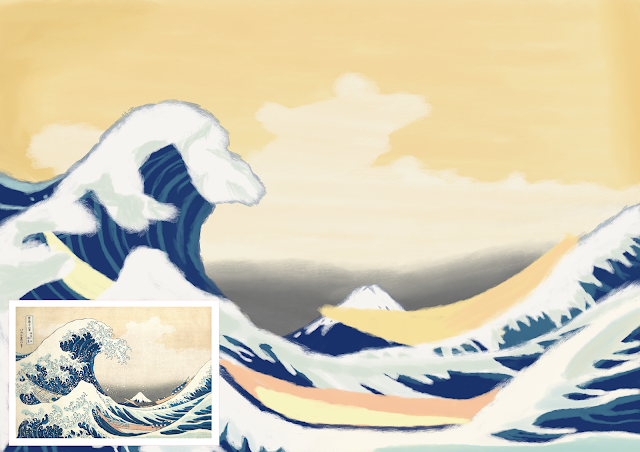
Continuing from the last master study I chose to try something a bit different that could potentially be more oriental. As of such I chose to do one of Hokusai's famous prints the great wave. The idea of these is to try and recreate the colors used as accurately as possible. Lookin at this now I think the colors for the water and boats are pretty close to the original The sky on the other hand looks to saturated when compared to the original that is more pale.

Photoshop lesson 3

Image
As we are moving on from the initial thumb-nailing stage we where taught more about color and composition in this lesson. This is for the final set of thumbnails and the final pieces themselves. I briefly know about color theory but have nether been taught it so this was useful for me, composition on the other hand has never been shown to me so I found that part quite enlightening. After wards we had to do a color study on a landscape artists where the goal is to recreate the colors of a landscape painting as accurately as possible. Which brings us to the a both image where I was truing to recreate the colors for the painting Nocturne: blue and silver-Chelsea by James Abbott Mcneill Whistler. I picked this one because I like how the reflection of the buildings could be seen in the water. This exercise was more about finding the right colors than accuracy which is why I wasn't too concerned with the proportions. For the most part I think the colors are pretty close to the original...

Photoshop lesson 2

Image
This Photoshop lesson was all about taking different pictures and layering them on top from each other. They are then painted over to create an image and can be used as a different method to make thumbnails. The ones here are for Baucis.

Photoshop lesson 1:The basics

Image
This is the work from the Photoshop lesson we had that covered the basics on how to use the software. I have used it before but I have never been taught how to use it so there parts here I found useful such as editing the spacing pressure settings for brushes. The top picture is where I used the different settings and brushes to see what effects I could create by making grass and rocks. This lead to creating thumbnails using the brushes in photoshop. Starting for one with Octavia which is not one of the cities we had to do but was good for a test. I haven't done this sort of thing before nor have I done it on Photoshop either so quality varies but I am improving, making them became easier when I found a brush thats opacity changes depending on the pressure I apply. The second set was made using a different technique in the form of the laso tool to select a service that could be filled in to create shapes. Personally I preferred the first method.